Wmlink/2sv: Walmart 2 Step Verification Setup, Login and Troubleshooting.
Walmart’s Two-Step Verification system, often called 2SV, is the security layer that allows associates to access OneWalmart from personal devices. If you have ever tried to check your schedule, pay information, or W-2 from home and hit a login wall, 2SV is usually the reason. Once it is set up properly, remote access becomes much easier. When it is not set up correctly, even the right password may not be enough.
This guide explains what wmlink/2sv and wmlink/2step are, how setup works, why the system often fails at home, and how to fix the most common problems associates run into.
What Is Wmlink/2sv?
Contents
- 1 What Is Wmlink/2sv?
- 1.1 What Is the Difference Between Wmlink/2sv and Wmlink/2step?
- 1.2 Why You Cannot Usually Set Up Wmlink/2sv From Home
- 1.3 Can You Use Wmlink Links From Home After Setup?
- 1.4 How to Set Up Wmlink/2sv
- 1.5 Why Wmlink/2sv Stops Working on a New Phone
- 1.6 How to Fix 2SV After Getting a New Phone
- 1.7 Common Wmlink/2sv Problems
- 1.8 Troubleshooting Table
- 1.9 Frequently Asked Questions
- 1.9.1 Is wmlink/2sv required for everyone?
- 1.9.2 Can I use Google Authenticator instead of VIP Access?
- 1.9.3 Do I have to pay for SMS codes?
- 1.9.4 Can I link two phones at the same time?
- 1.9.5 I am on leave. Can I still use 2SV?
- 1.9.6 Why does OneWalmart keep asking me to enroll in 2-Step Verification?
- 1.9.7 Why did 2SV stop working after I got a new phone even though I kept the same number?
- 1.9.8 What should I do if I switched from SMS to the VIP Access app?
- 1.9.9 Why does my VIP Access code say invalid even when I type it correctly?
- 1.9.10 Can I fix wmlink/2sv completely from home?
- 1.9.11 What does “403 Forbidden” mean when I try to open wmlink/2step at home?
- 1.9.12 Why is OneWalmart not sending me a text code anymore?
- 1.9.13 Does changing my phone number break Walmart 2SV?
- 1.9.14 Can my People Lead help with 2-Step Verification problems?
- 1.9.15 What is the easiest 2SV method for most associates?
- 1.9.16 Why does Me@Walmart say authentication failed after I upgraded my phone?
- 1.9.17 Can I use 2SV if I do not have a smartphone?
- 1.9.18 What if I accidentally deleted the VIP Access app?
- 1.9.19 How do I know whether my 2SV setup actually worked?
- 1.9.20 Is wmlink/2sv the same thing as logging into OneWalmart?
- 1.10 For New Walmart Employees.
wmlink/2sv is the internal Walmart shortcut used for Two-Step Verification enrollment and management. In practical terms, it is the page associates use to connect their Walmart account to a phone number, voice-call option, or the VIP Access app. This extra security step is what allows many associates to sign in from a personal phone, tablet, or home computer.
Two-Step Verification works by requiring two things. First, you enter something you know, which is your Walmart User ID and password. Then you confirm something you have, which is usually a one-time code sent by text, voice call, or the VIP Access app.
What Is the Difference Between Wmlink/2sv and Wmlink/2step?
For most associates, there is no practical difference. wmlink/2sv and wmlink/2step both refer to the same Walmart Two-Step Verification setup and management flow. Some associates remember it as 2SV, while others remember it as 2-Step Verification, so Walmart uses both naming styles.
Why You Cannot Usually Set Up Wmlink/2sv From Home
This is one of the most common points of confusion. New hires and even experienced associates often assume they can enroll from home, but that usually is not how the system works. Initial setup generally needs to be done while you are on the Walmart network, using a Walmart-connected workstation or approved company environment.
If you try to open the internal enrollment page from home b, for example go to https://wmlink/2sv, before setup is complete, you may see errors such as access denied, forbidden, or a page that simply never loads. That does not necessarily mean the account is broken. It usually means the enrollment step still has to be completed on-site.
Can You Use Wmlink Links From Home After Setup?
Usually not in the same way you can use OneWalmart. Most wmlink/ shortcuts are internal intranet shortlinks intended for the Walmart network. Setting up 2SV allows you to access eligible services from home through OneWalmart, but it does not automatically make every internal WMLink shortcut work off-network.
That is why associates often get confused. They complete 2SV and expect all wmlink pages to open from home, but many of those shortlinks still only function properly on Walmart systems. Learn more about Wmlinks at Wmlink/serializationreceiving and Wmlink/2step.
How to Set Up Wmlink/2sv
Step 1: Use a Work Computer
Go to a Walmart store, club, or facility workstation and sign in while connected to the internal network. This is the safest and most reliable way to complete the initial setup.
Step 2: Open the 2SV Page
Type wmlink/2sv or wmlink/2step into the browser address bar. Make sure you type it in the address bar, not into a search engine. Use wmlink/2sv or https://wmlink/2sv.
Step 3: Choose a Verification Method
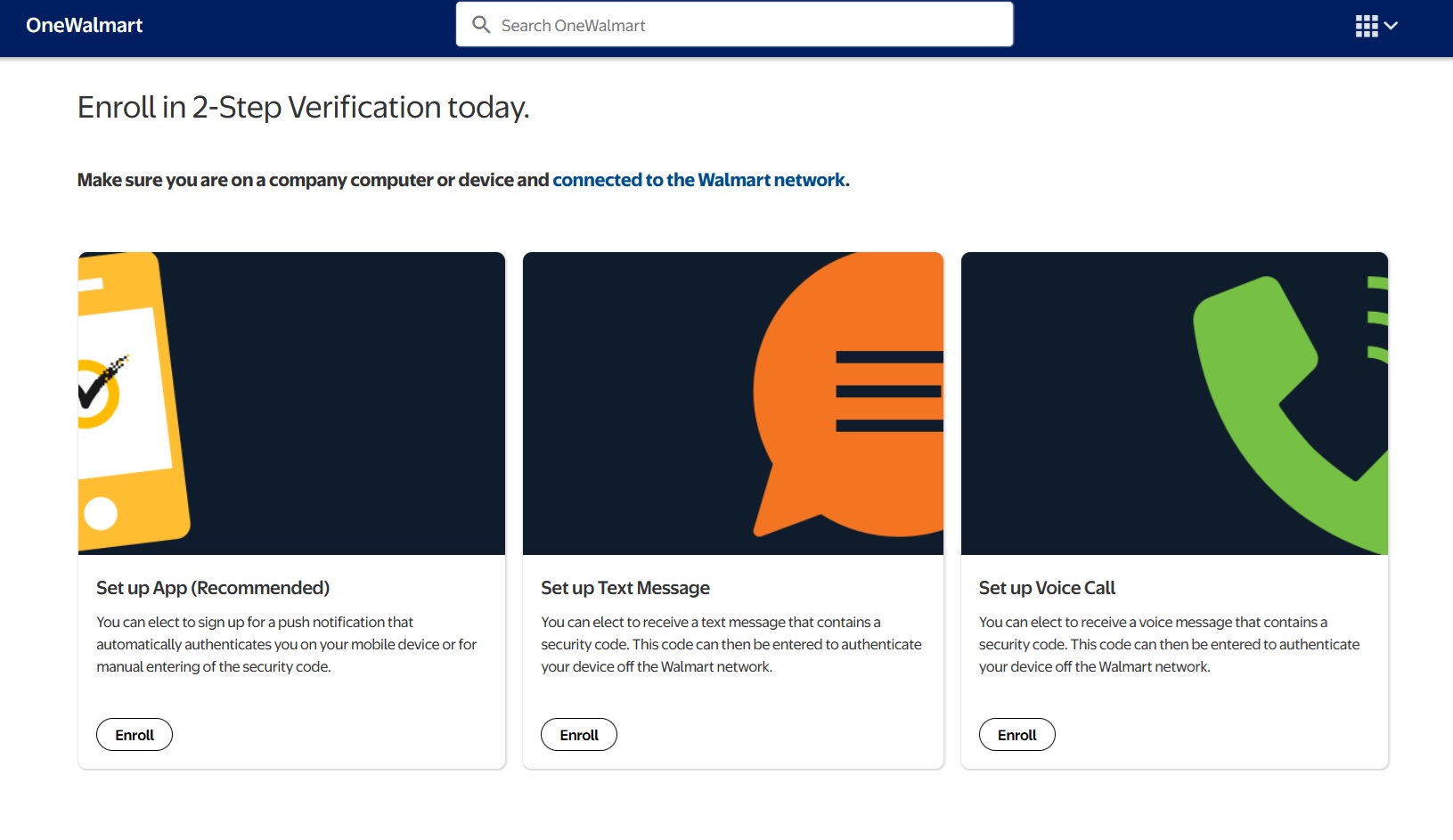
You will usually see multiple options. Common choices include text message, voice call, and the VIP Access app. Text message is simple, voice call helps if you do not want to rely on SMS, and the VIP Access app is often considered the most reliable for regular remote access.
Alternatively, visit https://me.walmart.com/content/usone/en_us/company/programs/home2SV.html from a company computer or device.
Step 4: Register Your Device
Enter your phone number if you are using SMS or voice call. If you are using VIP Access, enter the required credential details shown in the app.
Step 5: Verify the Setup
The system should send a test code or confirmation step. Complete that step to finish linking your account. Once that is done, your Walmart account should be ready for personal-device verification.
Why Wmlink/2sv Stops Working on a New Phone
This is one of the biggest problems associates talk about. A new phone often breaks Two-Step Verification even if you kept the same phone number. That is because the security setup may be tied to the specific device or app credential, not just the number itself.
This happens a lot with the VIP Access app. The app on the new phone may have different credential information than the old device, so the system no longer recognizes it as the same enrolled phone.
How to Fix 2SV After Getting a New Phone
Go Back to the 2SV Page at Work
The most reliable fix is to return to a work computer, open wmlink/2sv or wmlink/2step, and remove the old device from your profile.
Clear the Old Device
Look for the option to remove, clear, or un-enroll the device that is no longer valid. This step matters because the old record may block your new phone from working correctly.
Re-Enroll the New Device
After removing the old setup, add your new phone and complete the registration again. If you are using VIP Access, use the new app credential details from the replacement phone.
Test Before Leaving Work
If possible, test the login while you still have access to a Walmart-connected workstation. That way, if there is another problem, you can fix it immediately instead of discovering the issue later at home.
Common Wmlink/2sv Problems
SMS Code Never Arrives
This is one of the most frequently reported issues. Sometimes the code is delayed, sometimes the phone number is outdated, and sometimes associates find that text verification has become unreliable. If this happens often, switching to VIP Access is usually a more stable option.
VIP Access Code Does Not Work
If the app-generated code fails, check whether your phone’s date and time are set automatically. If the clock on your device is off, even by a little, app-based security codes can fail. Some users also need to re-enroll the app after changing phones.
Invalid Credential ID
If you are entering the VIP Access credential manually, make sure you type it exactly as shown. Small typing errors can cause the setup to fail.
403 Forbidden or Access Denied at Home
This usually means you are trying to open an internal WMLink page from outside the Walmart network, or that 2SV was never completed properly in the first place. Start from OneWalmart instead of trying to force the internal shortcut from home.
2SV Worked Before but Suddenly Stopped
This often happens after a phone replacement, SIM change, app reset, or account credential change. In many cases, the fix is to un-enroll the old setup and enroll the current phone again.
Troubleshooting Table
| Problem | Likely Fix |
|---|---|
| SMS code not arriving | Wait briefly, confirm your number is correct, or switch to VIP Access if SMS remains unreliable. |
| VIP code rejected | Turn on automatic date and time, then try again. Re-enroll if the app is tied to an old device. |
| New phone not working | Go to the 2SV page at work, remove the old phone, and enroll the new one. |
| 403 Forbidden at home | Use OneWalmart for remote access and remember that many wmlink pages are internal only. |
| Authentication keeps failing | Check whether your old device is still enrolled or contact support for a reset. |
Frequently Asked Questions
Is wmlink/2sv required for everyone?
It is generally required for associates who want to access OneWalmart or related work information from a personal device. Without it, many off-site logins for schedules, pay information, and account tools will not work. If you only use Walmart-connected systems at work, you may not notice it as much, but remote access usually depends on it.
Can I use Google Authenticator instead of VIP Access?
Walmart’s app-based setup is generally associated with VIP Access rather than a generic authenticator app. Even if another authenticator works for other websites, that does not mean it will work here. The safest choice is to use the method Walmart actually supports.
Do I have to pay for SMS codes?
Walmart does not normally charge you for the security process itself. However, standard carrier text messaging rules still apply. If your phone plan charges for texts or has unusual restrictions, that could affect your experience.
Can I link two phones at the same time?
Usually the system is meant to work with one primary active setup rather than multiple equal devices. That is one reason new-phone changes cause so much trouble. If you want to switch devices, it is usually better to remove the old one first.
I am on leave. Can I still use 2SV?
In many cases, yes, if your account is still active and the setup is already working. The problem is that if it breaks while you are on leave, you may not have easy access to a work computer to re-enroll it. In that situation, support may be your best option.
Why does OneWalmart keep asking me to enroll in 2-Step Verification?
This usually means the enrollment was never fully completed or the system no longer trusts the device you are using. It can also happen after changing phones or resetting the authentication app. If it keeps happening, re-check the setup on a work computer instead of assuming it will fix itself.
Why did 2SV stop working after I got a new phone even though I kept the same number?
This is one of the most common Reddit complaints. The system may be tied to the old device record or old VIP credential, not just the phone number. Keeping the same number does not always preserve the old verification setup.
What should I do if I switched from SMS to the VIP Access app?
Make sure the new method is fully enrolled and confirmed before relying on it from home. If the old method is still attached or partially active, it can create confusion during login. It is usually best to test the new method while you are still at work.
Why does my VIP Access code say invalid even when I type it correctly?
In many cases, the issue is the phone’s clock. If date and time are not synced automatically, the generated code may be considered out of sync. Rechecking phone time settings solves this more often than people expect.
Can I fix wmlink/2sv completely from home?
Sometimes small issues can be handled remotely, especially if the account is already enrolled and only the code method is acting up. But many of the most common problems, especially new-phone issues, still require going back to a Walmart-connected workstation to remove and re-enroll the device. That is why so many associates end up fixing it during their next shift.
What does “403 Forbidden” mean when I try to open wmlink/2step at home?
It usually means you are trying to access an internal-only shortcut outside Walmart’s network. This is one of the most common errors people mention online. In most cases, it is not a sign that your account is locked; it just means that the page itself is not meant for direct off-site access.
Why is OneWalmart not sending me a text code anymore?
Associates on Reddit often report delayed or missing SMS codes. Sometimes the issue is temporary, and the texts arrive later all at once. In other cases, people end up switching to VIP Access because the app is more reliable than text delivery.
Does changing my phone number break Walmart 2SV?
Yes, it can. If your old number is still the one registered in the system, the verification process will keep trying to use outdated information. You usually need to update or re-enroll the method at work so the system points to the new number or new app setup.
Can my People Lead help with 2-Step Verification problems?
They may be able to point you in the right direction or help you use a work computer to access the 2SV page. For account-specific resets, however, some situations still require formal support. If the issue is more technical than procedural, support is often the next step.
What is the easiest 2SV method for most associates?
Many people start with SMS because it feels the simplest. Over time, though, many associates report that the VIP Access app is more dependable, especially when text messages are delayed. The best method is usually the one you can access consistently and test successfully.
Why does Me@Walmart say authentication failed after I upgraded my phone?
This is another very common new-phone problem. The app may still be expecting the old 2SV registration, especially if VIP Access was tied to the previous device. The usual fix is to remove the old device in the 2SV page and enroll the current one.
Can I use 2SV if I do not have a smartphone?
Usually yes, because voice call or SMS options may still be available depending on your setup. A smartphone is mainly needed for app-based verification. If you prefer not to use an app, ask about the supported alternatives during setup.
What if I accidentally deleted the VIP Access app?
If the app was tied to your enrolled setup, deleting it can break your ability to generate the required codes. Reinstalling the app alone may not fully solve the problem if the old credential relationship is gone. In many cases, re-enrollment through the 2SV page is the cleanest fix.
How do I know whether my 2SV setup actually worked?
Do not assume it worked just because the screen finished loading. The best way to know is to test a remote login after enrollment and confirm you receive and can use the code successfully. If possible, do this while you still have access to a Walmart workstation in case something needs to be adjusted.
Is wmlink/2sv the same thing as logging into OneWalmart?
No. Wmlink/2sv is the setup and management path for the security layer. OneWalmart is the broader portal you are trying to access. In simple terms, 2SV is the gatekeeper, and OneWalmart is the destination.
For New Walmart Employees.
Two-Step Verification is one of those systems that feels minor until it stops working. When it is enrolled correctly, it becomes a quick routine part of logging in from home. When it breaks, it can lock you out of schedules, pay information, and other account tools until the setup is repaired.
The most important rule is simple: if you change phones, do not wait until you are home and locked out. Recheck your wmlink/2sv or wmlink/2step setup on a work computer as soon as possible. That small step prevents most of the frustration associates describe later.