The associate app is MyWalmart, formerly named Me@Walmart, and it covers your schedule, PPTO, shift swaps and two step verification. It is the fastest route to everything an associate checks daily. What it does not carry is your attendance points or your paystub, which live in the portal.
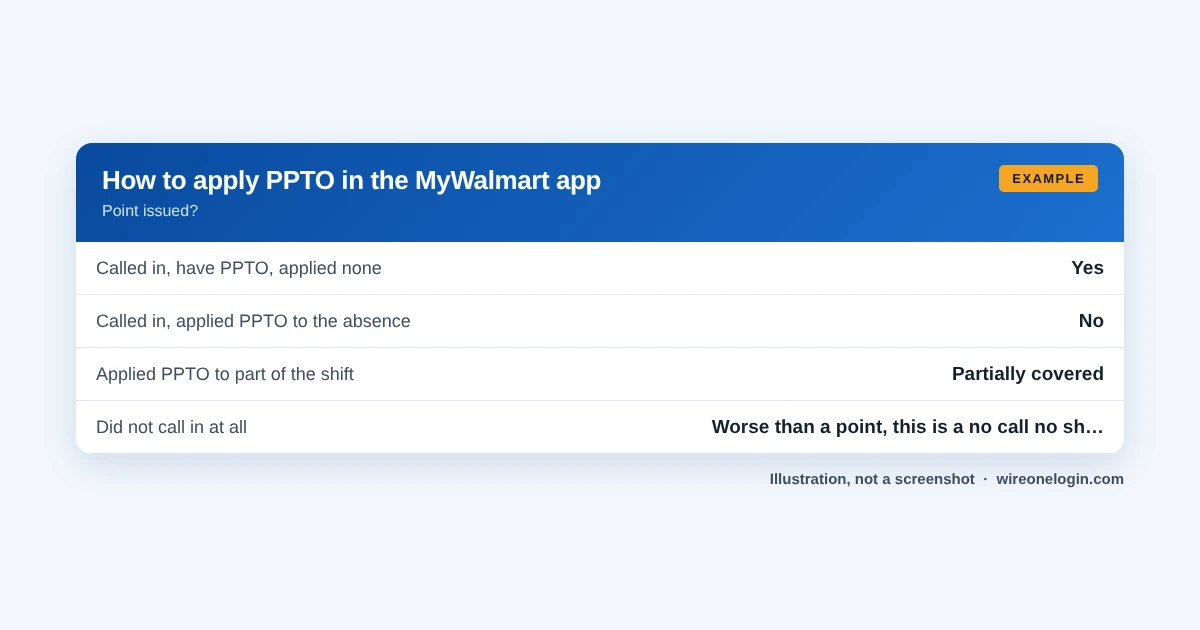
The one thing on this page that will genuinely save you money is the PPTO section. Applying PPTO to an absence is a separate action from calling in, and the app is where you do it.
MyWalmart app at a glance
Last verified November 10, 2026. Walmart changes these systems often, so if something on screen does not match what you read here, the system changed and this page has not caught up yet.
On this page
What the MyWalmart app does
The pattern: the app is built for what is happening now and next. Records of what already happened, and anything involving money or tax, stay in the portal.
How to download and set it up
Downloading the customer shopping app by mistake is extremely common, because it is the one that ranks for Walmart in app stores. The associate app is MyWalmart.
Using the app for two step verification
The app can handle the two step verification prompt, which makes home logins to the portal considerably less annoying than entering codes by hand.
This matters more than it sounds. Two step verification is the one requirement that stands between you and the portal from home, and having the app on your phone is the smoothest way to satisfy it.
Change your verification method before you change your phone, not after. A phone number or device you no longer have is the hardest version of this problem to unwind, and it reliably happens at the worst moment.
Applying PPTO in the app
This is the section worth reading twice, because the misunderstanding here costs associates points they did not need to take.
PPTO accrues at 1 hour for every 30 hours worked, for full time and part time alike, and ppto is capped at 48 hours a year on the national plan.
Notifications worth turning on
Most app notifications are noise. Three are not.
- Schedule changes. A posted schedule can change, and the app is where it appears. This is the one that prevents a missed shift.
- Swap and request outcomes. So you learn a swap was approved rather than discovering on the day that it was not.
- Verification prompts. Which is how the app helps you sign in elsewhere.
Ask Sam and the in store tools
The app also carries in store tools, and what is available depends on your role and your store. Ask Sam is the internal search assistant for finding products, prices and procedures on the floor.
These are genuinely useful if your job is on the sales floor and irrelevant if it is not, which is why the app can look different between two associates comparing phones.
What the app cannot do
Being clear about this saves time hunting for things that were never there.
The app on a personal versus a store device
Store devices and your personal phone run the app differently, and knowing which is which prevents a specific frustration.
Store devices sit inside Walmart’s network, which is why signing in on one skips the verification step. Your personal phone is outside it, which is why your own install asks for verification and why the two can behave differently on the same day.
MyWalmart app problems and fixes
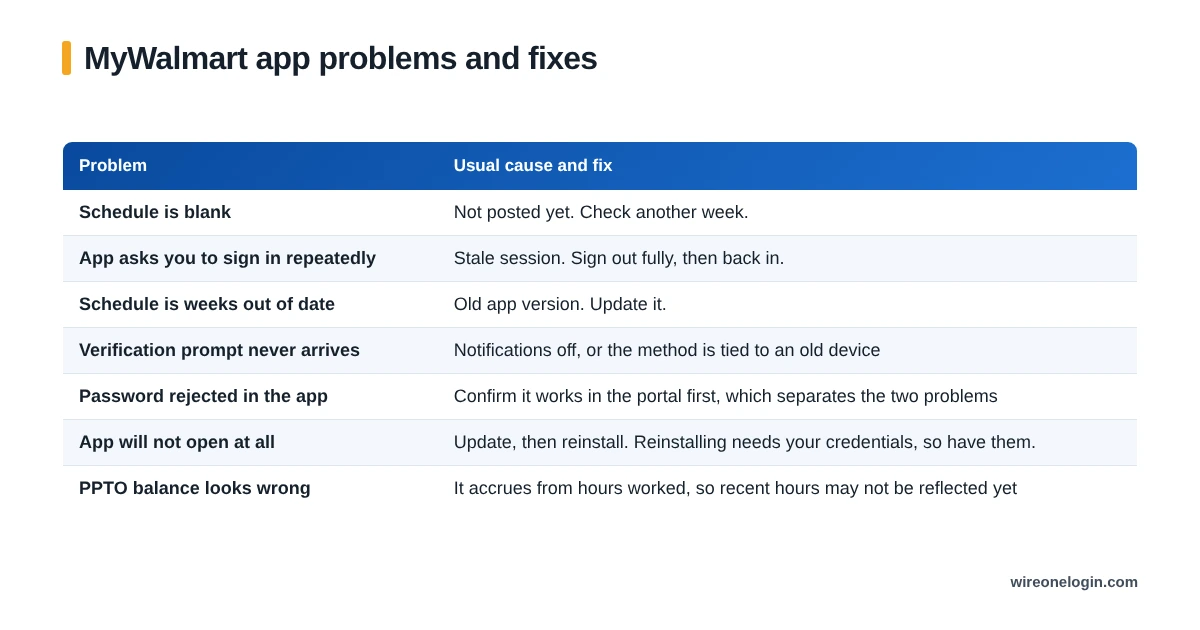
Before reinstalling anything, make sure you can get into the portal in a browser. An associate who reinstalls the app and then cannot complete verification has two problems instead of one.
What happens to the app when you leave
App access ends with your employment, same as the portal. The app is not a separate account, it is a view onto Walmart systems using your associate credentials.
Which is the argument for doing the download jobs before your last day: recent paystubs, your W-2 if the year has closed, and a confirmed Computershare login if you hold shares. All easy now, all awkward later.
MyWalmart app FAQ
What is the MyWalmart app?
The associate app is MyWalmart, formerly named Me@Walmart. It covers the things associates check daily: schedule, PPTO, shift swaps and verification.
Is MyWalmart the same as Me@Walmart?
Yes, Me@Walmart was renamed MyWalmart. If you are looking for Me@Walmart in the app store, MyWalmart is the one you want.
Can I use the MyWalmart app on my own phone?
Yes, that is what it is for. Store devices run a version used on the floor, and your personal install is the one that handles your schedule and PPTO.
Can I apply PPTO in the MyWalmart app?
Yes, and it is the fastest route. Applying it is what prevents an attendance point, and having a PPTO balance does nothing on its own.
Does the MyWalmart app show attendance points?
No. Points and punch detail are in GTA through the portal. The app covers schedule and time off.
Do Sam’s Club associates use MyWalmart?
No. Sam’s Club associates use a separate app, Me@Sams.
Where this information comes from
Related guides
More on the systems and rules this page touches: