wmlink/servicenow opens Walmart’s IT ticketing system, and it works while you are signed in to One.Walmart. Use it for genuine technology faults: a device that will not work, a system throwing errors, access you should have and do not. It is not the route for pay, attendance or benefits questions.
The single thing that determines how fast a ticket gets resolved is how specific it is. A ticket naming a device, an error message and a time gets fixed. One saying the system is broken gets a reply asking which system.
wmlink/servicenow at a glance
Last verified November 10, 2026. Walmart changes these systems often, so if something on screen does not match what you read here, the system changed and this page has not caught up yet.

On this page
What wmlink/servicenow is for
ServiceNow is a service management platform many large companies use for IT tickets. Walmart’s instance is reached through the portal, same as Workday, which is why the shortcut requires a session.
How to raise a ticket
What to put in the ticket
Six things. A ticket with all six rarely needs a follow up question, which is the whole point.
- What you were trying to do. The goal, not just the error.
- What happened instead. The exact error message, typed out rather than paraphrased.
- Which device. Asset tag or identifier if it has one.
- When it happened. Date and rough time, which lets someone find it in logs.
- Whether it is repeatable. Every time, or once? This changes the diagnosis entirely.
- Whether others are affected. One device or everyone on shift, which separates a broken device from an outage.
The error message verbatim is the highest value line in any ticket. A paraphrase loses the exact string somebody could search for.
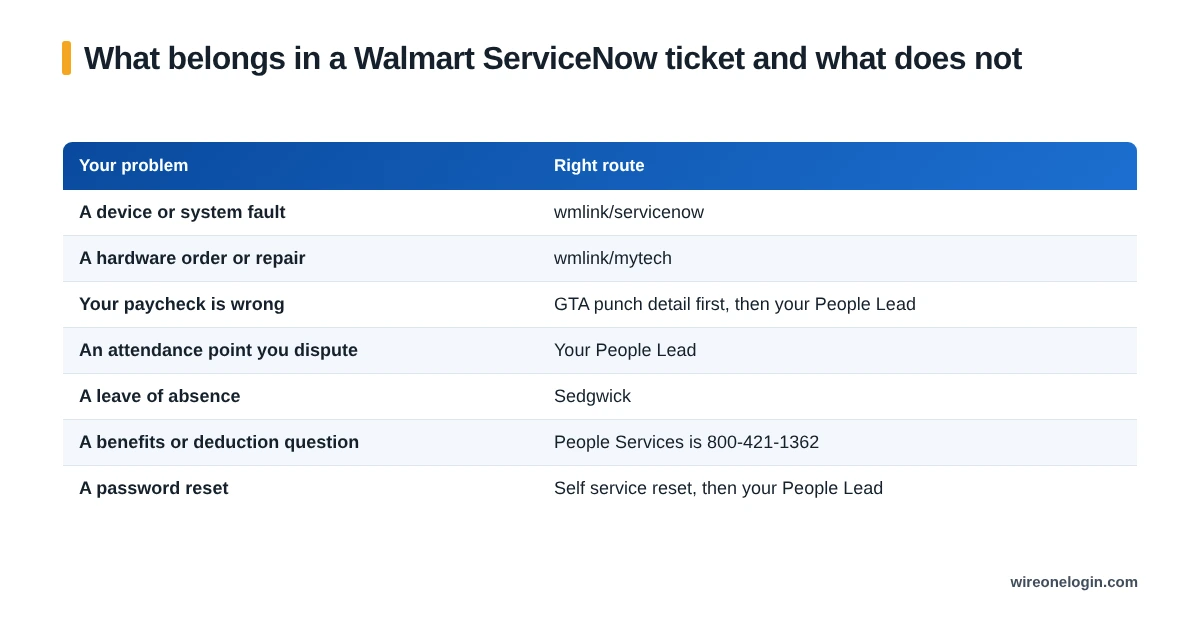
What belongs here and what does not
Sending a non IT problem here delays it, because it gets read, reassigned and often returned to you with a pointer to the right place.
How to check a ticket you already raised
Through the same site, in your tickets or requests area, using the number you were given. This is the practical reason to save the number at submission rather than assuming you will find it again.
If you did lose it, the ticket is normally still listed against your account, so look there before raising a duplicate. Duplicates slow both tickets down.
When to escalate
Escalate when the impact is bigger than a routine ticket, and say why rather than simply asking for it to be faster.
- It is stopping work now. A register or a system the floor depends on is different from an inconvenience.
- It affects everyone on shift. Say so in the ticket, because that changes the priority legitimately.
- There is a deadline attached. An enrollment window or a tax deadline is a real constraint.
- Nothing has moved and the problem persists. Your People Lead can push from the store side.
wmlink/servicenow FAQ
What is wmlink/servicenow?
The shortcut to Walmart’s IT service management system, where you raise tickets for technology problems. It works while you are signed in to One.Walmart.
How do I raise an IT ticket at Walmart?
Go to wmlink/servicenow signed in, choose the category that matches your problem, and describe it with specifics. A ticket number comes back.
Should I use ServiceNow for a password reset?
Try the self service reset and your People Lead first. ServiceNow is for genuine system faults rather than routine account tasks that have their own route.
How do I check my Walmart IT ticket?
Through the same site, in your tickets or requests area. You need the ticket number, so save it when you raise it.
Can I raise a ticket from home?
Yes, once you are signed in to the portal, which from outside a store means verification has to be set up.
What should I not use ServiceNow for?
Pay disputes, attendance points, leave claims and benefits questions, which all have their own proper routes and will only be redirected.
Where this information comes from
Related guides
Related guides for Walmart associates: