Yes, you can log in to One.Walmart from home, but only once two step verification is set up. Go to one.walmart.com, sign in with your WIN and password, then approve the verification prompt. The web address will change to a Walmart single sign on page on the way through, which is normal.
Nearly every failed home login comes down to the same thing, and it is not your password. It is that verification was never set up, or was set up on a phone you no longer have.
One.Walmart home login at a glance
Last verified November 10, 2026. Walmart changes these systems often, so if something on screen does not match what you read here, the system changed and this page has not caught up yet.
On this page
Can you use One.Walmart at home?
Yes. One.Walmart is built to be reached from anywhere, which is the point of it. You can check your schedule, look at your paystub, request time off and read benefits information from your own sofa.
What changes away from the store is how Walmart confirms it is really you. On a store device you are already inside the network and it mostly takes your word for it. From home you have to prove it, and that is two step verification.
How to log in to One.Walmart from home
Why the address changes to a different URL
Type one.walmart.com and you will see the address bar jump to a longer Walmart web address before anything loads. That is Walmart’s single sign on service, and handing you to it is how the login is supposed to work.
It alarms people because the address no longer looks like the one they typed. Check the domain rather than the whole string. If it is a wal-mart.com or walmart.com address you are where you should be. If it is anything else, close the tab.
A redirect to an unfamiliar looking Walmart address is normal. A page asking for your WIN on a domain that is not Walmart’s is not. That difference is worth ten seconds of your attention every time.
What you need before you can log in from home
What works at home and what does not
One.Walmart login problems and how to fix them
In rough order of how often each one is actually the problem:
- Verification was never set up. The fix is a store device and wmlink/2step.
- You changed phone. The prompt is going to a device you no longer have. A People Lead can get you re-enrolled.
- Password expired. Walmart expires them on a cycle, so a password that worked last month may simply be old.
- Wrong username. People try an email address. It wants your WIN.
- A browser holding a stale session. A private window rules this in or out in about fifteen seconds.
- Genuine outage. Rare, and usually obvious because nobody on your shift can get in either.
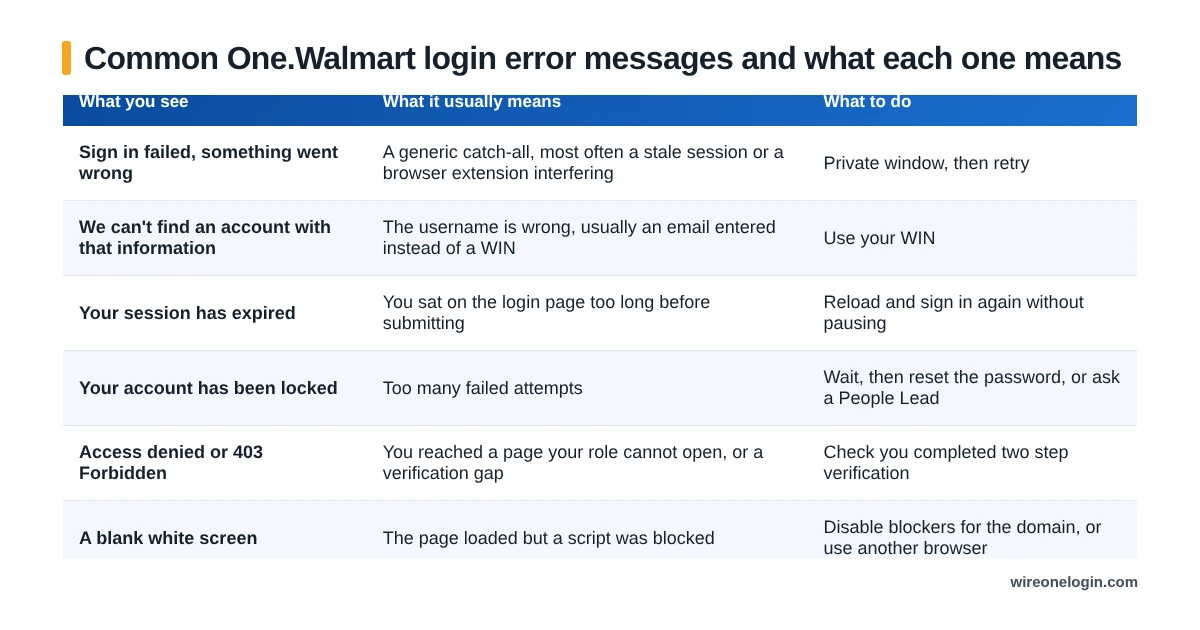
What each One.Walmart error message means
People paste these strings straight into search, so here is what each one actually indicates. The wording shifts between portal updates, but the causes do not.
Two of these are worth separating out. Account locked is a count of failed attempts, so more attempts make it worse rather than better. Access denied is about permissions and verification, not your password, so resetting the password will not touch it.
Logging in on a phone instead
The MyWalmart app, formerly called Me@Walmart, is usually the easier route. It handles the verification step itself and keeps you signed in, which removes most of the friction of logging in repeatedly through a browser.
The app is the better tool for schedules, shift swaps and applying PPTO. For benefits enrollment and anything document heavy, the browser is still easier to work in.
Logging in after you have left Walmart
Portal access is removed shortly after your last day, which catches people who meant to download a paystub and never got round to it.
Pay and tax documents stay available to former associates through separate routes rather than through One.Walmart, and those are worth sorting out before your access goes rather than after.
Staying safe from fake One.Walmart sites
Associate portals attract fake login pages, because a WIN and password are worth money to whoever collects them. A few habits make this a non issue:
- Type one.walmart.com rather than clicking a search result or a link in a message.
- Check the domain is walmart.com or wal-mart.com before entering anything.
- Walmart will not ask for your full password by text, email or phone call.
- Treat any page asking for your WIN plus your bank details as hostile. That combination has no legitimate reason to exist.
One.Walmart login FAQ
Can I log into One.Walmart from home?
Yes. You need two step verification set up first, which you do at wmlink/2step. Without it the portal will not let you through from outside the store network.
Why does one.walmart.com go to a different web address?
Because Walmart hands you to its single sign on service to check who you are before the portal loads. The address changing is normal and is not a sign that anything is wrong.
What is my One.Walmart username?
Your WIN, your Walmart Identification Number. Some screens accept a user ID instead, but the WIN is the one that always works.
Do I need the MyWalmart app to log in at home?
No, a browser works. The app is more convenient for your schedule and for applying PPTO, and it can handle the verification step for you.
Why does it work at the store but not at home?
Store devices are inside Walmart’s network and skip the extra verification. From home you have to pass two step verification, which is where almost every home login failure happens.
Can I still log in after leaving Walmart?
Access is removed shortly after your last day. Former associates get pay and tax documents through the separate routes covered further up this page.
Where this information comes from
Related guides
Related guides for Walmart associates: