Update your address, name and contact details in Workday, reached through One.Walmart. Of these, the address is the one with real consequences: your W-2 and your benefits correspondence are mailed there.
This is a five minute job that prevents a specific and very common problem, which is a tax form going to a place you no longer live.
Updating details at a glance
Last verified November 10, 2026. Walmart changes these systems often, so if something on screen does not match what you read here, the system changed and this page has not caught up yet.
On this page
How to update your details in Workday
Why your address matters more than you think
Update it when you move, not at tax time. By late January the W-2 has already been produced and mailed, and a change then does not recall it.
Changing your legal name
A legal name change normally requires documentation, and for a good reason: payroll and tax reporting have to match your Social Security record, or your earnings get reported under a name that does not line up.
The sequence matters. Update your name with the Social Security Administration first, then with Walmart. Doing it the other way round creates a mismatch between what is reported and what the government has on file.
Phone and emergency contacts
Two different things that both live here, and one of them is easy to leave stale for years.
- Your own phone number. Used for contact, and related to your two step verification method, which is a separate setting worth checking at the same time.
- Your emergency contact. The one people never revisit. Worth a look if your circumstances have changed since you were hired.
While you are in here, check that the phone number on your verification method is current. A code going to a number you no longer control is the hardest lockout to unwind.
Moving to a different state
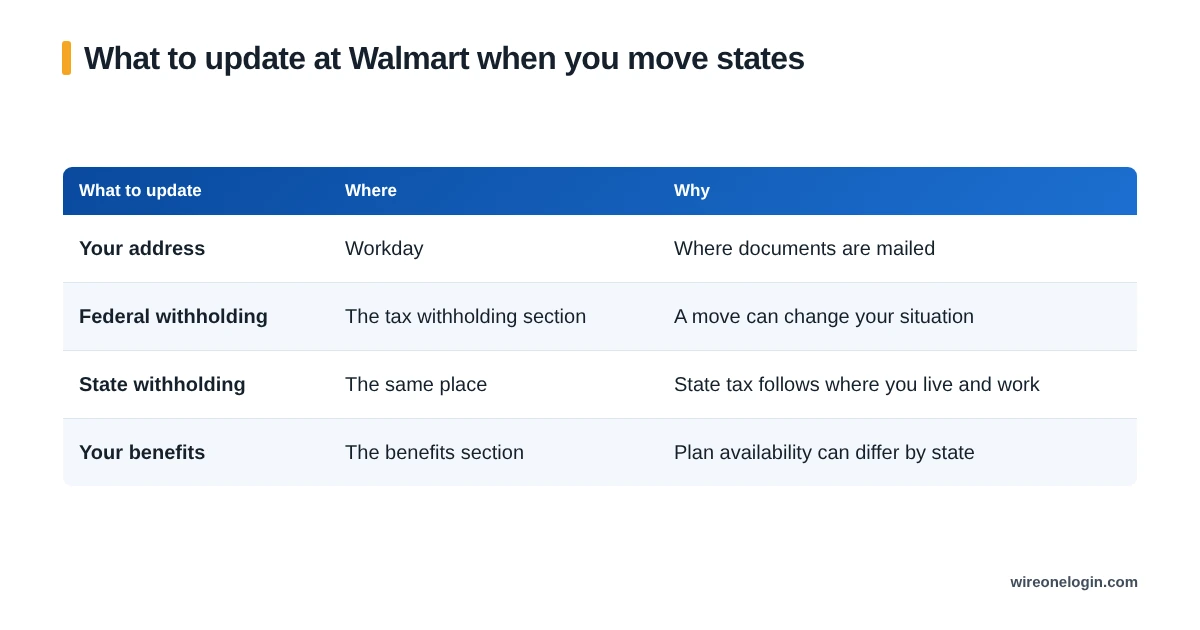
Moving states is the change with the most moving parts, because it affects three separate things rather than one.
That last row surprises people. Accrual differs by plan: National, Standard, Continuous (DC, Montgomery County MD, Washington, no annual maximum), Continuous with Kin Care (California), and Standard with Kin Care (Illinois), so a move can change your accrual as well as your tax.
When a change needs approval
Some changes save immediately, and some go to review before taking effect. The confirmation on screen is what tells you which you got, which is why it is worth reading rather than clicking past.
If a change you submitted has not appeared after a reasonable interval, check whether it is still pending review before resubmitting it. Duplicate submissions slow both down.
Updating personal info FAQ
How do I change my address at Walmart?
In Workday, reached through One.Walmart. It matters because your W-2 and benefits correspondence are mailed to the address on file.
How do I change my name at Walmart?
A legal name change in Workday normally requires documentation, because payroll and tax reporting have to match your Social Security record.
Why can I not change my details at workday.com?
Because Walmart’s Workday is reached through Walmart’s single sign on. Go through the portal.
Do I need to tell Walmart if I move states?
Yes, and update your tax withholding too. State withholding follows where you live and work, and getting it wrong is tedious to unwind on a return.
How long does a Workday change take to apply?
Some changes save immediately and some need review. The confirmation on screen tells you which one you got.
Does updating my address change my tax withholding?
Not automatically. Treat them as two separate jobs, because a move can change which state you owe tax to.
Where this information comes from
Related guides
If this page did not cover your situation, these might: