wmlink/mytech opens Walmart’s technology request and support area, and it works while you are signed in to One.Walmart. Use it for devices and hardware: something broken, something your role needs, something behaving wrongly.
As with every wmlink address, it skips navigation rather than authentication. Typed while signed out it lands you on the login page, which is not the shortcut failing.
wmlink/mytech at a glance
Last verified November 10, 2026. Walmart changes these systems often, so if something on screen does not match what you read here, the system changed and this page has not caught up yet.
On this page
What wmlink/mytech is for
How to raise a request
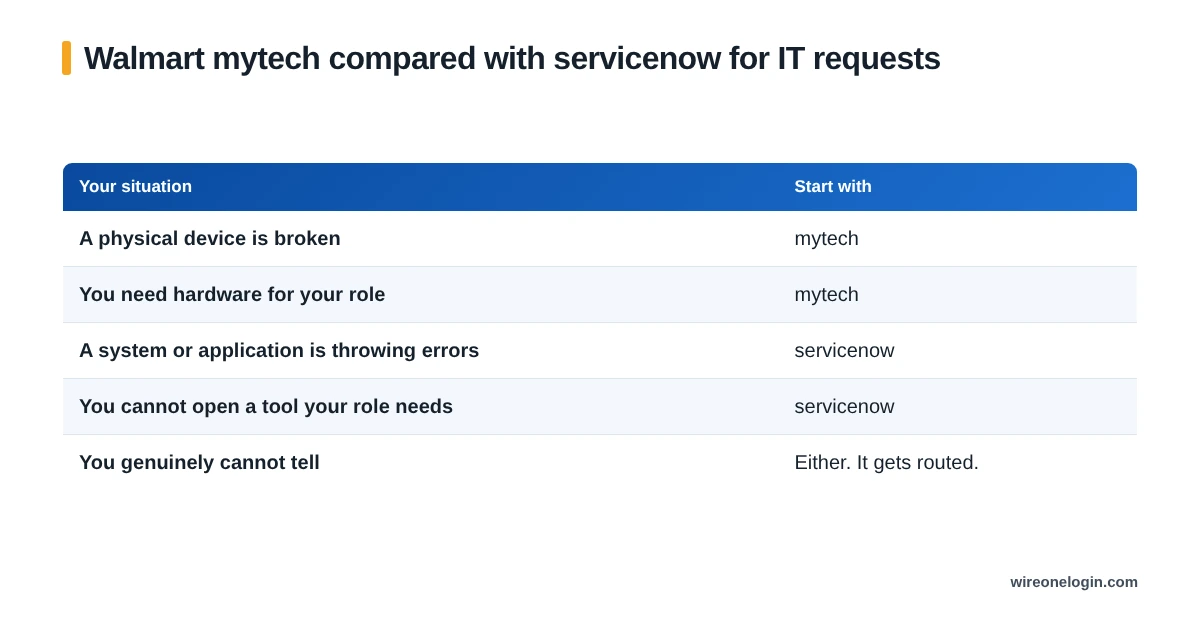
mytech versus servicenow
The honest answer is that these overlap, the boundary moves between portal updates, and it matters less than people worry it does.
A request in the wrong one of these two gets forwarded rather than lost. A pay or attendance question sent to either gets returned, which is the mistake actually worth avoiding. The ServiceNow guide covers what belongs there.
A broken store device
A device out of action is a floor problem as well as a technology problem, so it gets reported twice.
What to include
- The device identifier. The single most important line.
- What it does. The exact symptom, including any error message word for word.
- When it started. And whether anything changed around then.
- Whether it is repeatable. Every time, or intermittently.
- Whether other devices do it. Which separates one broken unit from a wider fault.
- Impact. Whether work is stopped now, which legitimately changes priority.
wmlink/mytech FAQ
What is wmlink/mytech?
The shortcut to Walmart’s technology request and support area, used for devices and hardware. It works while you are signed in to One.Walmart.
What is the difference between mytech and servicenow?
Broadly, mytech is the front door for technology and device requests, and ServiceNow is the ticketing system behind IT support. In practice they overlap and either route gets your issue logged.
How do I report a broken store device?
Through the technology support route, with the device identifier, what it does and when it started. Tell your People Lead too, since a device out of action affects the floor.
Can I request hardware for myself?
Requests are tied to your role and what it requires. A request for something your role does not need will be declined rather than ignored.
Does mytech work from home?
Yes, once you are signed in to the portal, which from outside a store means verification has to be set up.
Can I use mytech for a password reset?
Try the self service reset and your People Lead first. Technology support is for device and system faults.
Where this information comes from
Related guides
Related guides for Walmart associates: